
'BillGate' - Security & Threat Research on Microsoft Dataverse & Power Pages
Table of Contents
- Executive Summary
- What Starknex observed?
- Affected
- Technical detail
- Vulnerable Power Pages Stats
- Remediation
- Detection and threat hunting
- Coordinated disclosure
Executive Summary
Starknex identified a widespread, default-configuration data exposure affecting Microsoft Dataverse and Microsoft Power Pages (formerly Power Apps Portals). The exposure lets an external party (and in the most severe case, an entirely unauthenticated one), read Dataverse records that were never intended to be publicly accessible.
There are two distinct but related exposures:
-
1. Dataverse Default environments + guest (B2B) accounts.
Microsoft Dataverse Default environments cannot have a security group assigned, so access cannot be scoped at the environment level.
Where guest users exist in a tenant, they may be able to read thesystemuserstable through the standard Dataverse Web API, which allows a malicious user to get access to all user information in the Microsoft Entra ID Tenant. -
2. Power Pages Web API/OData feed exposure.
Power Pages sites expose Dataverse tables to site visitors.
Where a table permission grants Read at Global scope to the Anonymous Users or Authenticated Users web role, and the Web API or an OData feed is enabled for that table, the entire table can be retrieved and paged over HTTPS. When the permission sits on Anonymous Users, no authentication is required at all.A related issue lets a guest authenticate to a Power Pages portal through an Entra login endpoint that is still reachable even when its button is not shown on the sign-in page, and obtain records as an Authenticated User.
The impact ranges from disclosure of users in the Microsoft Entra ID Tenant (including names, job titles, internal email addresses, UPNs, direct phone numbers, Entra object IDs, licensing and enabled/disabled status), through to bulk disclosure of customer PII, documents, support tickets, portal account identities and, on a subset of sites, Portal password hashes.
As part of this, Starknex and Trusted Partners have been observing & tracking an active threat actor publicly known as “Exfilsquad”, who has claimed breaches derived from Microsoft Power Apps/Dynamics 365 misconfigurations, describing datasets consistent with Global-scope
reads of Dataverse incident, email and contact tables.
Starknex originally notified trusted parties and partners under a Starknex TLP:AMBER advisory (containing technical details and remediation steps) originally on the 29th July 2026 and; for version 2.0 on the 30th July 2026. Within the Cyber Threat Intelligence community, this advisory has been known & tracked as ‘BillGate’.
Starknex has responsibly disclosed the following vulnerabilities and vulnerable sites to Microsoft, Government Partners, Trusted Partners, CERTs globally and contactable vulnerable organisations, at a global scale.
What Starknex observed?
Exfilsquad’s Data Leak Site (DLS) displays a victim entry with a dataset size of ~130 GB uncompressed and 8M+ records, a downloadable sample archive, and a countdown demanding contact by 5 August 2026.
The listing includes contact details for named executives of the listed organisation, which the actor claims were drawn from the victim’s own CRM records.
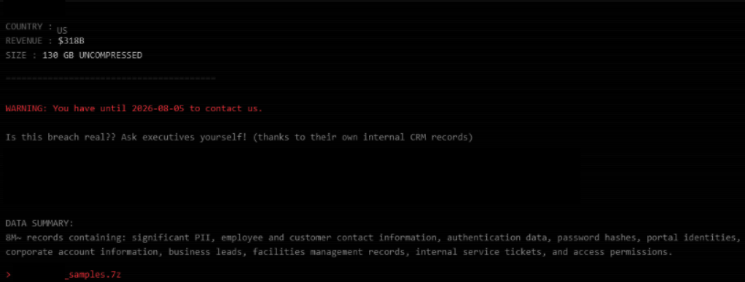
Exfilsquad DLS: exfil5gqmbxrg6yky5aeitkdj7kfwxxjh3wxzrtlewjqi2x67o634iyd[.]onion
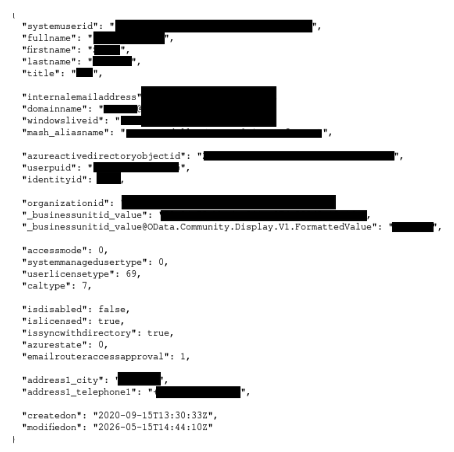
The _businessunitid_value field and its OData formatted value displays the business
unit name, which allowed Starknex to attribute the sampled records to the victim’s specific
Dataverse environment and Microsoft Entra ID Tenant.
Starknex understands that environment has been scoped to a security group by its owner.
Affected
Dataverse systemusers path
Any Microsoft Entra ID tenant that meets all of the following:
- 1. Power Platform/Microsoft Dataverse is enabled; and
- 2. one or more guest (B2B) or external accounts exist in the tenant; and
- 3. one or more Dataverse environments exist that are not scoped by a security group, which necessarily includes the tenant’s Default environment, since a security group cannot be assigned to it.
Because Default environments are provisioned automatically and cannot be security group scoped, Starknex assesses that many tenants with guest users have some degree of exposure by default.
Endpoint pattern
https://<org>.crm<region>.dynamics.com/api/data/v9.2/systemusersPower Pages path
Any organisation operating a Microsoft Power Pages site that meets the following.
Authentication path
- 1. The site has Microsoft Entra ID configured as an identity provider, whether or not it is displayed on the login page; and
- 2. the actor holds a guest (B2B) or external account in that tenant; and
- 3. open registration is enabled on the site, or a contact record already exists for the authenticating identity.
Data-access path
- 4. One or more table permissions grant Read at Global scope; and
- 5. those permissions are assigned to the Anonymous Users or Authenticated Users web role; and
- 6. the Portals Web API is enabled for the table, or a list with an OData feed is published for it.
Endpoint patterns
https://<portal-url>/Account/Login/ExternalLogin?returnUrl=%2F&provider=https%3A%2F%2Flogin.windows.net%2F<Tenant-ID>%2F
https://<portal-url>/_api/<table>
https://<portal-url>/_odata/<feed>
Technical detail
1. Dataverse Default environments and guest access
The structure of sample data published by the threat actor is consistent with the Dataverse
systemusers table - the table holding an identity record for every user provisioned into a
Dataverse/Dynamics 365 environment.
Starknex assesses it is possible that access could’ve been obtained via a pre-existing guest (Entra ID B2B) account. This is based on the viability of a technique identified by Starknex Security Research.
Security-group-scoped environments behave correctly. When a non-member tries to sign into an environment, it returns a
notMemberOfOrg error at the Dataverse/Dynamics 365 sign-in stage. Environments, however without a security
group return no such block. Because the Default environment cannot take a security group,
it is the reliable weak point.
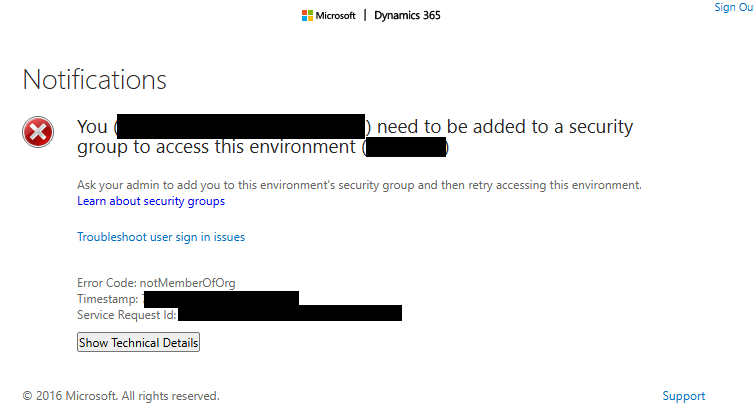
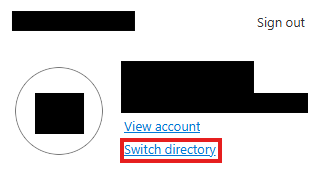
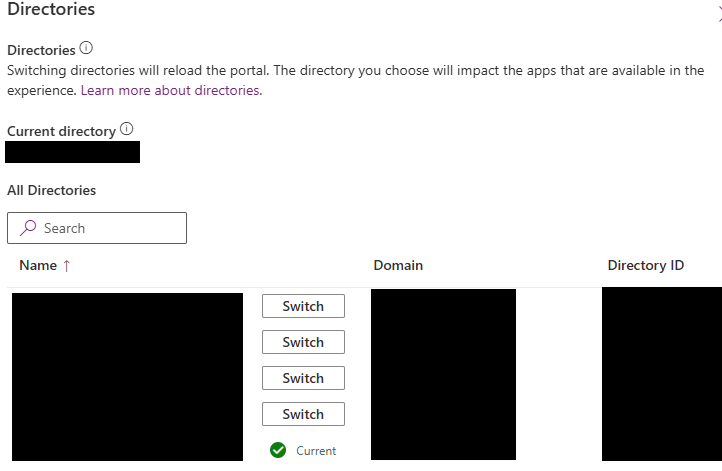
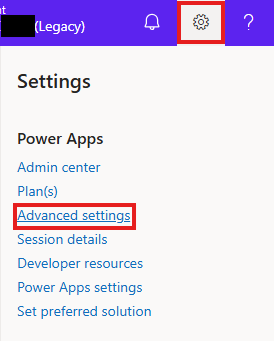
An external guest can switch directories (via make.powerapps.com) into a tenant they hold a
guest account in, reveal that environment’s Dataverse URL through Advanced Settings, and
request /api/data/v9.2/systemusers to enumerate every user in the tenant - including other external/guest users.
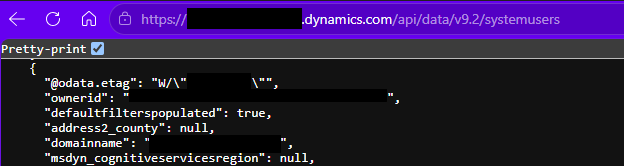
Full structure of Systemusers Table (including vulnerable fields):
{
  "@odata.context": "https://<org>.crm<region>.dynamics.com/api/data/v9.2/$metadata#systemusers",
  "value": [
    {
      "@odata.etag": null,
      "ownerid": null,
      "address1_shippingmethodcode": null,
      "yammeruserid": null,
      "nickname": null,
      "issyncwithdirectory": null,
      "_businessunitid_value": null,
      "address1_upszone": null,
      "fullname": null,
      "address2_city": null,
      "address1_postofficebox": null,
      "importsequencenumber": null,
      "utcconversiontimezonecode": null,
      "overriddencreatedon": null,
      "organizationid": null,
      "_siteid_value": null,
      "stageid": null,
      "_queueid_value": null,
      "photourl": null,
      "address1_utcoffset": null,
      "address1_latitude": null,
      "incomingemaildeliverymethod": null,
      "yomifirstname": null,
      "msdyn_gridwrappercontrolfield": null,
      "systemmanagedusertype": null,
      "address2_fax": null,
      "_transactioncurrencyid_value": null,
      "governmentid": null,
      "msdyn_bottype": null,
      "yomifullname": null,
      "address2_line1": null,
      "msdyn_botsecretkeys": null,
      "address1_telephone3": null,
      "applicationid": null,
      "address1_telephone2": null,
      "address1_telephone1": null,
      "msdyn_owningenvironmentid": null,
      "msdyn_ismultichannelintentenabled": null,
      "address2_postofficebox": null,
      "isdisabled": null,
      "caltype": null,
      "address2_latitude": null,
      "processid": null,
      "address2_shippingmethodcode": null,
      "address2_composite": null,
      "systemuserid": null,
      "msdyn_botprovider": null,
      "traversedpath": null,
      "address1_city": null,
      "_positionid_value": null,
      "isintegrationuser": null,
      "defaultodbfoldername": null,
      "displayinserviceviews": null,
      "address2_line2": null,
      "address1_addressid": null,
      "address1_addresstypecode": null,
      "address2_stateorprovince": null,
      "sharepointemailaddress": null,
      "_createdby_value": null,
      "address2_postalcode": null,
      "preferredemailcode": null,
      "isemailaddressapprovedbyo365admin": null,
      "firstname": null,
      "entityimage_url": null,
      "address1_composite": null,
      "msdyn_botapplicationid": null,
      "_modifiedby_value": null,
      "msdyn_usertype": null,
      "jobtitle": null,
      "timezoneruleversionnumber": null,
      "address2_telephone3": null,
      "address2_telephone2": null,
      "address2_telephone1": null,
      "address1_postalcode": null,
      "address2_upszone": null,
      "userpuid": null,
      "address2_line3": null,
      "msdyn_bothandle": null,
      "address1_country": null,
      "userlicensetype": null,
      "msdyn_botdescription": null,
      "personalemailaddress": null,
      "address2_longitude": null,
      "_modifiedonbehalfby_value": null,
      "address1_line2": null,
      "azurestate": null,
      "address1_county": null,
      "_defaultmailbox_value": null,
      "_territoryid_value": null,
      "outgoingemaildeliverymethod": null,
      "invitestatuscode": null,
      "address1_fax": null,
      "identityid": null,
      "islicensed": null,
      "_createdonbehalfby_value": null,
      "modifiedon": null,
      "defaultfilterspopulated": null,
      "address2_name": null,
      "accessmode": null,
      "disabledreason": null,
      "address2_utcoffset": null,
      "applicationiduri": null,
      "_mobileofflineprofileid_value": null,
      "address1_line1": null,
      "lastname": null,
      "address2_county": null,
      "versionnumber": null,
      "msdyn_agentType": null,
      "address1_line3": null,
      "deletedstate": null,
      "azuredeletedon": null,
      "azureactivedirectoryobjectid": null,
      "msdyn_botendpoint": null,
      "address1_stateorprovince": null,
      "_parentsystemuserid_value": null,
      "windowsliveid": null,
      "entityimage_timestamp": null,
      "title": null,
      "mobilephone": null,
      "msdyn_ischatintentenabled": null,
      "_msdyn_defaultpresenceiduser_value": null,
      "employeeid": null,
      "exchangerate": null,
      "_calendarid_value": null,
      "skills": null,
      "emailrouteraccessapproval": null,
      "entityimageid": null,
      "isallowedbyipfirewall": null,
      "msdyn_gdproptout": null,
      "preferredaddresscode": null,
      "domainname": null,
      "msdyn_activeconversationlimit": null,
      "passporthi": null,
      "yomilastname": null,
      "msdyn_isexpertenabledforswarm": null,
      "setupuser": null,
      "internalemailaddress": null,
      "address2_addresstypecode": null,
      "passportlo": null,
      "createdon": null,
      "yomimiddlename": null,
      "_cdm_company_value": null,
      "homephone": null,
      "preferredphonecode": null,
      "address1_name": null,
      "address1_longitude": null,
      "entityimage": null,
      "yammeremailaddress": null,
      "middlename": null,
      "address2_addressid": null,
      "salutation": null,
      "msdyn_capacity": null,
      "address2_country": null,
      "msdyn_isvoiceintentenabled": null,
      "mobilealertemail": null
    }
  ]
}
2. Power Pages authentication via an unlisted external-login URL
A Power Pages sign-in page shows only the identity providers the organisation chooses to display. Where Entra ID is configured as a provider but its button is hidden, the underlying endpoint remains directly reachable:
https://<portal-url>/Account/Login/ExternalLogin?returnUrl=%2F&provider=https%3A%2F%2Flogin.windows.net%2F<Tenant-ID>%2FThe portal’s Tenant ID can be read from the portal’s page source (search for tenant):
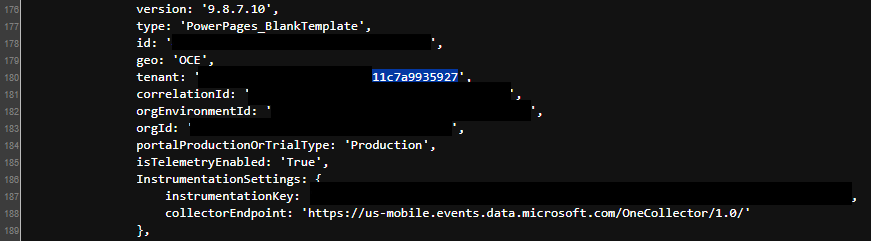
If the requester is a guest in that tenant, sign-in completes and a portal session is established, carrying the Authenticated Users web role.
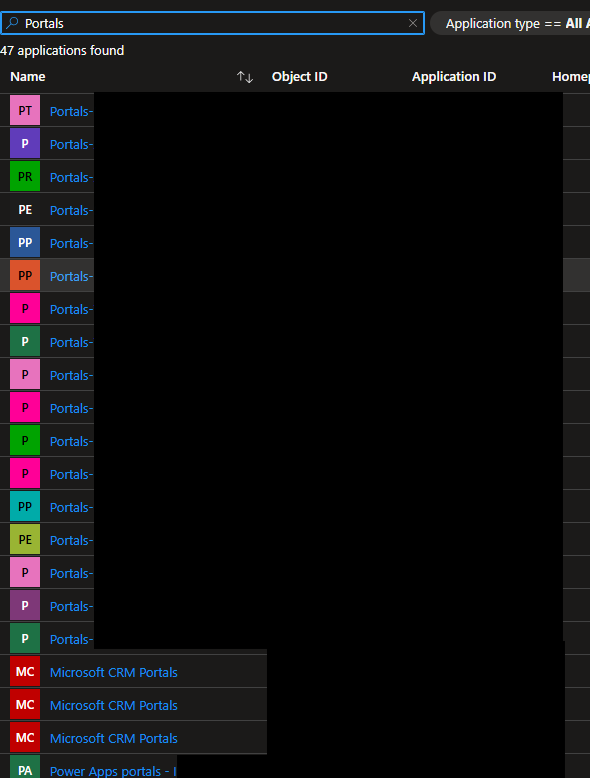
Each Power Pages site also registers an App Registration and an Enterprise Application in Entra under predictable naming conventions:
- •
Portals-<NAME> - •
Microsoft CRM Portals, - •
Power Apps Portal - <NAME>
which makes portals in a tenant enumerable by a guest with directory read.
These records can be viewed on the Microsoft Entra ID Portal at: https://entra.microsoft.com/#view/Microsoft_AAD_IAM/StartboardApplicationsMenuBlade/~/AppAppsPreview
3. Power Pages Web API and OData feed exposure
Power Pages exposes Dataverse tables to visitors two ways:
- • Web API, enabled per table via the site settings
Webapi/<table>/enabled, with a column allow-list atWebapi/<table>/fields. Where the allow-list is the*wildcard, every column of the table is returned. - • OData feeds, configured on individual lists and served from
/_odata/<feed-name>.
Access through both is resolved by table permissions bound to web roles, and scope is the determining factor:
- • Contact- and account-scoped permissions restrict a caller to their own records and behave as intended.
- • Global-scope Read returns every record in the table, and standard OData query options
(
$top,$skip,$skiptoken,$select,$filter) allow the full result set to be paged.
Two web roles matter because an external party can hold them:
- • Anonymous Users - held by anyone. Global-scope Read here is unauthenticated disclosure of the full table.
- • Authenticated Users - held by any identity that can complete sign-in, including a guest arriving via the external-login endpoint above.
How the paths combine
- 1. Enumerate portals from Entra enterprise-application registrations; authenticate as an
existing guest via the
ExternalLoginendpoint, acquiring the Authenticated Users role. - 2. Request
/_api/<table>or/_odata/<feed>for tables where that role holds Global-scope Read. - 3. Page the result set.
Where the misconfiguration sits on Anonymous Users, steps 1–2 are unnecessary and the exposure is fully unauthenticated. Starknex assesses the anonymous variant as the more severe and the more likely to have been harvested at scale.
Vulnerable Power Pages Stats
Following coordinated disclosure to Microsoft, who have made some platform-wide changes, and Starknex conducting notification & remediation efforts to Trusted Partners, Government Partners and affected organisations, Starknex did a re-sweep of all affected sites in our list.
The exposure radius has significantly been reduced but far from closed:
- • Initial Discovery: 30/07/2026 and 31/07/2026 - 100% Vulnerable Sites
- • Post Remediation re-sweep: 01/08/2026 - 40.7% Vulnerable Sites and 07/08/2026 - 34.3% Vulnerable Sites
- • 69.7% of sites are no longer returning exposed records (10/08/2026)
- • 30.3% of sites remain vulnerable (10/08/2026)
By Category - Still vulnerable vs Remediated:
| Category | Still vulnerable | Remediated |
|---|---|---|
| Credentials | 16% | 84% |
| Entra ID - All User Info | 37% | 63% |
| Confidential Documents | 34% | 66% |
| Personal data (PII) | 38% | 62% |
| No PII observed | 32% | 68% |
Exact numbers and additional stats will be published at a later appropriate date.
Remediation
Block Dataverse for guest/external users via Conditional Access
Because Microsoft does not support assigning security groups to Default environments, block Dataverse for external users with a Conditional Access policy.
- • Conditional Access: https://entra.microsoft.com/#view/Microsoft_AAD_ConditionalAccess/ConditionalAccessBlade/~/Policies/menuId//fromNav/Identity
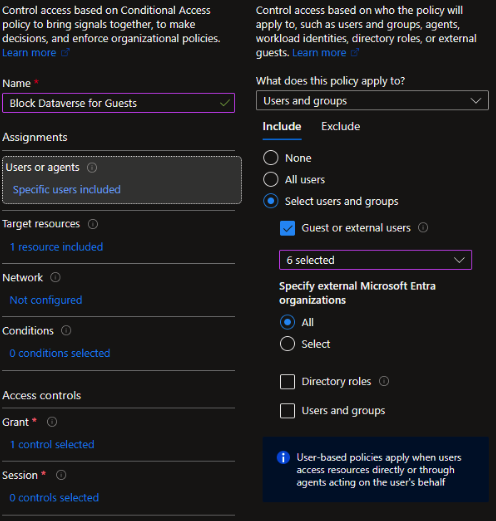
- • Users: Select users and groups → Guest or external users → all applicable guest types →
Specify external Microsoft Entra organisations: All.
- • Target resources: Resources → Select resources → Dataverse
(
00000007-0000-0000-c000-000000000000).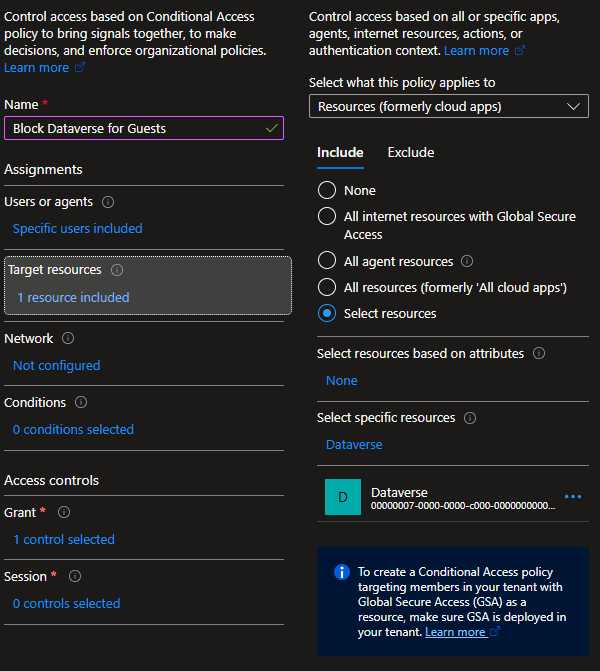
- • Grant: Block access.
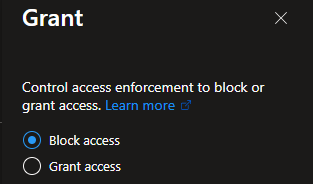
This policy targets only the Dataverse resource GUID. It does not cover the Power Pages portal applications - see Conditional Access per portal application below.
Entra ID - audit guest accounts
Remove orphaned, expired, suspicious and never-signed-in guests. https://entra.microsoft.com/#view/Microsoft_AAD_UsersAndTenants/UserManagementMenuBlade/~/AllUsers/menuId/
Entra ID - restrict guest invitations
Set guest-invite restrictions to Only users assigned to specific admin roles, or the most restrictive No one can invite. https://entra.microsoft.com/#view/Microsoft_AAD_IAM/CompanyRelationshipsMenuBlade/~/Settings/menuId/ExternalIdentitiesGettingStarted
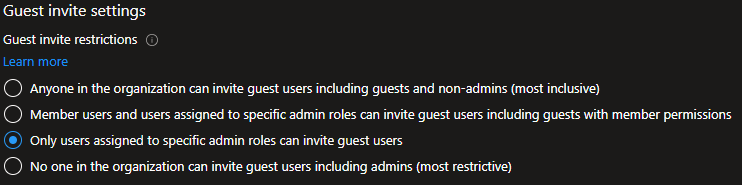
Entra ID - restrict guest directory enumeration
In external collaboration settings, set guest access to the most restrictive level (guests limited to their own directory objects). This also removes enterprise-application (portal) enumeration by guests.
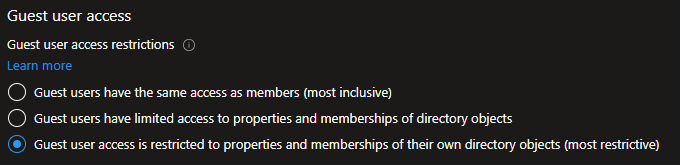
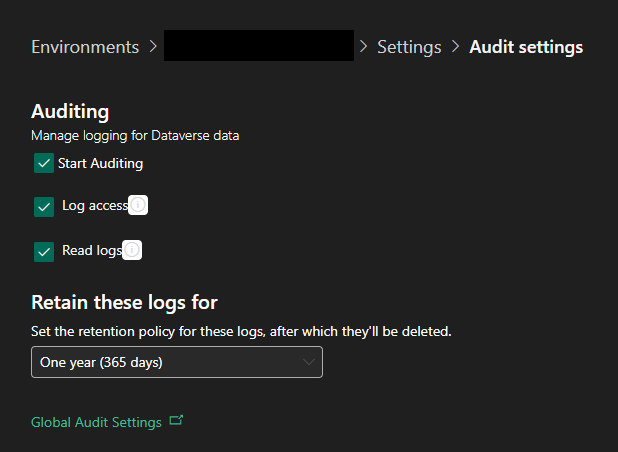
Microsoft Dataverse - enable auditing
Per environment (on Power Platform Admin Center): Settings → Audit and logs → Audit settings; enable Start Auditing, Log
access and Read logs; set retention to One year (365 days).
Starknex recommends 12-month
retention to support incident response and threat hunting.
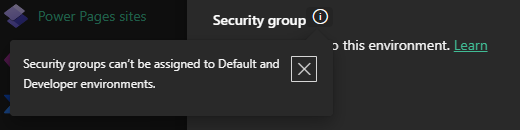
Microsoft Dataverse - assign security groups to every non-Default environment
By default, you cannot assign security groups to Default environments.
This is the only environment-level control that reliably prevents the access path, which is why the Conditional Access block above is required for those.
Power Pages/Entra ID - apply Conditional Access per portal application
Each portal authenticates against its own enterprise application, so per-application policies are required. In tenants with many portals this is unmaintainable; instead consider a policy that blocks guest/external users from all resources with an explicit allow-list of approved applications, or Conditional Access application filters driven by custom security attributes on portal application objects.
Power Pages - disable Web API and OData feeds for tables that don’t need them
Enabled features accumulate over a site’s lifetime; most sites expose more tables than they
use. Turn off Webapi/<table>/enabled and remove unused OData list feeds.
Site settings can be found in one of the two applications in your Dataverse Environment:
- •
Portal Managementfor older Power Apps Portals - •
Power Pages Managementfor newer Power Pages sites.
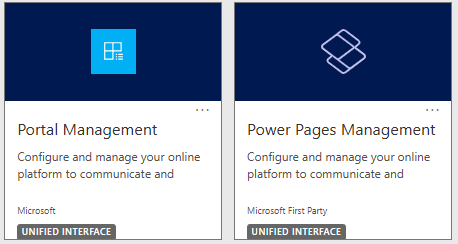
Then find Websites on the left hand navigation bar and select the affected Power Pages site.
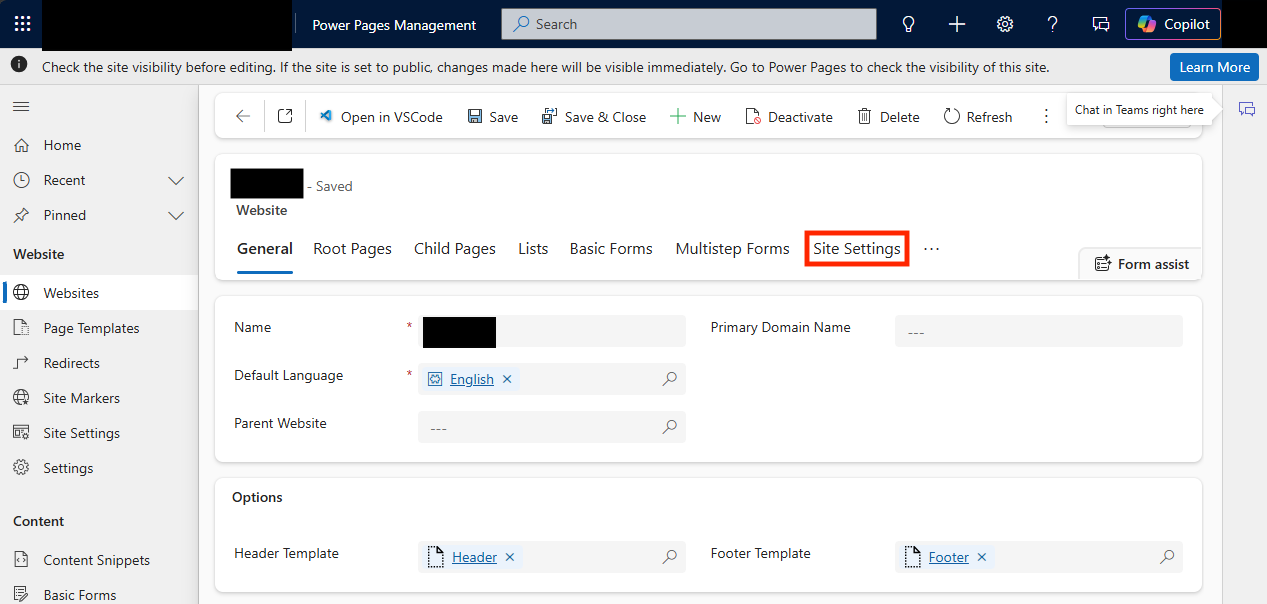
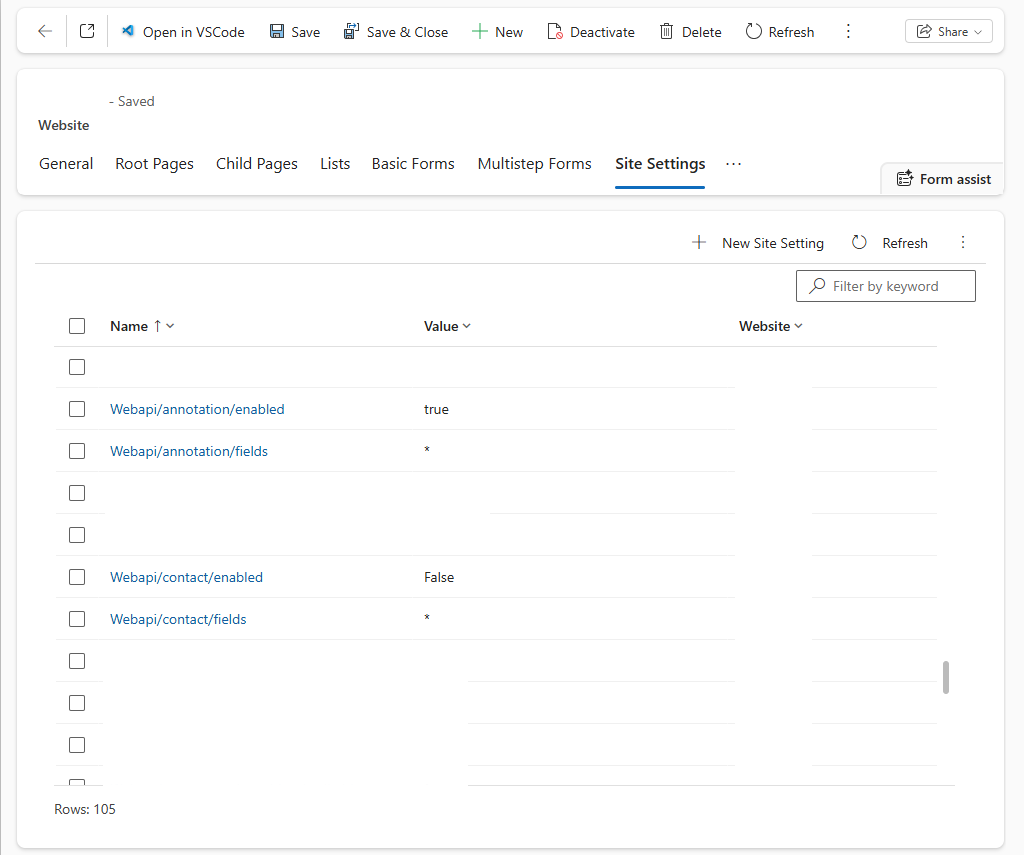
Go to Site Settings and create a new site setting or find current record containing these values:
Webapi/table/enabled = false
“table” being a placeholder
Power Pages - audit table permissions for Global scope
Audit every table permission across every site and identify any granting Read at Global
scope, then establish which web roles hold it. Pay particular attention to Global scope on
contact, incident, email, account, lead, or any custom table holding personal data,
assigned to Anonymous Users or Authenticated Users.
To verify (on sites you operate): request /_api/<table> and /_odata/<feed> for
candidate tables, first unauthenticated and then as a controlled guest account. A 403
indicates permissions are constraining access; a 200 with a populated body indicates
exposure, and the response reveals which columns are reachable.
Power Pages - deploy a WAF in front of every site
Beyond rate-limiting, a Web Application Firewall is the only durable route to request-level logging for these paths. Per site: Admin centre → Site → Performance & Protection → enable Content Delivery Network and Web Application Firewall.
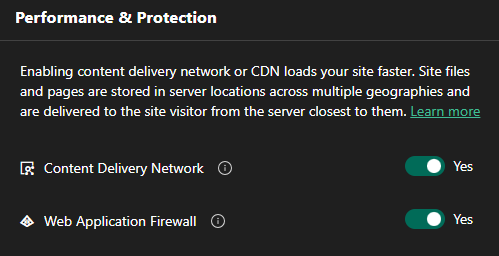
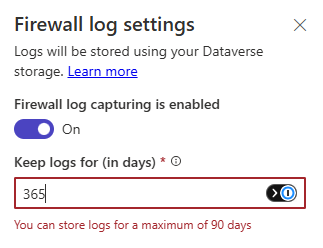
In addition, organisations may implement a third party WAF such as Azure Front Door instead which provides third party SIEM and log ingestion capability. - see Logging and visibility limitations below.
Reference: https://learn.microsoft.com/en-gb/power-pages/security/web-application-firewall
Power Pages - rate-limit /_api and /_odata at the edge
Bulk pagination is distinguishable from normal traffic by volume alone. A WAF rate-limit rule is the fastest compensating control while permission review proceeds, and needs no change to site configuration.
Power Pages - include decommissioned and pilot sites
Retired, dev/test and forgotten sites remain reachable and are the least likely to have been reviewed. Treat every site in the tenant as in scope.
Detection and threat hunting
Dataverse systemusers access
- • Alert on internal or guest users requesting
/api/data/v9.2/systemusers. Guest principals carry#EXT#in the UPN. - • Any guest principal touching
systemusersshould be for review - not only during this incident window.
Power Pages access paths
- • Dataverse audit logs cannot attribute Power Pages activity: auditing records the portal application user retrieving records, not the external party that requested them. They are still useful for establishing whether bulk reads occurred against a table.
- • If a WAF is enabled, download the WAF logs and hunt for:
- • sequential paged retrieval against
/_apiand/_odata; - • high request volume against those paths from a single source IP or ASN;
- • requests carrying OData pagination/filter parameters (
$top,$skip,$skiptoken,$select,$filter); - • guest principals authenticating to portal enterprise applications in Entra sign-in logs.
- • sequential paged retrieval against
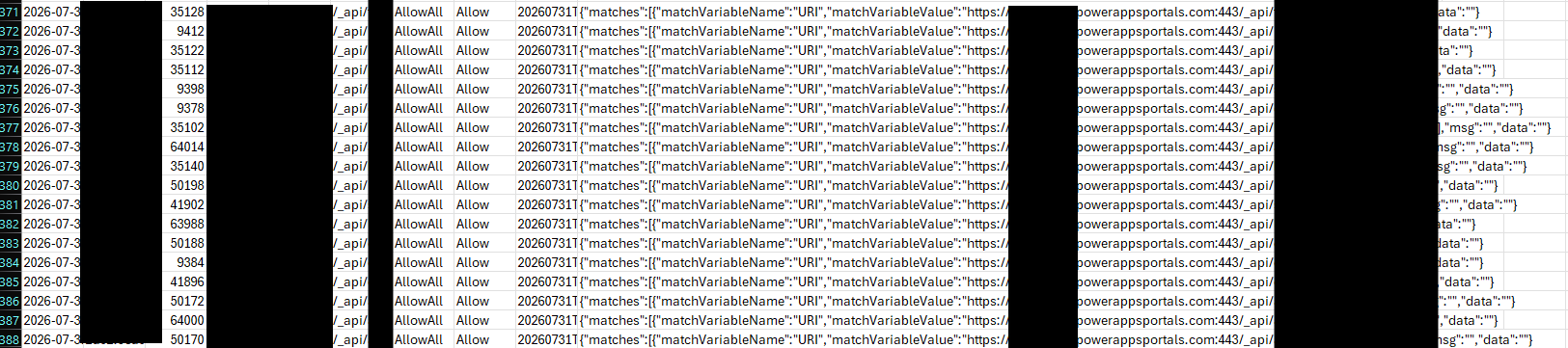
Reference: https://learn.microsoft.com/en-gb/power-pages/security/web-application-firewall-logs
Logging and visibility limitations
Power Pages provides no first party, request-level logging that reaches a SIEM; a WAF is the practical route to oversight. WAF log capture also counts toward the environment’s Dataverse storage.
In addition, the Power Pages WAF feature only allows logs to be stored for a maximum of 90 days.
Coordinated disclosure
NOTE: This is a configuration issue, not a CVE or a single vendor bug. Each affected organisation must fix its own configuration.
Starknex has:
- • Conducted Security & Threat Research in good faith;
- • Responsibly disclosed findings and initial security & threat research to Microsoft by providing a master list of all discovered vulnerable Power Pages sites, vulnerable tables, and Dataverse findings, which they have started to do on platform-level remediation, reflected in the re-sweep figures above;
- • Worked with Government Partners, CERTs and Trusted Partners to remediate vulnerable sites, bringing the exposure number down significantly;
- • Withheld all victim-identifying detail from public; and
- • Notified affected parties through proactive responsible disclosure and outreach, where a channel exists.
If your organisation uses Power Pages and would like to know whether any of your organisation’s sites were observed as vulnerable as part of this research, please contact us at outreach@starknex.com.
Site-specific findings are shared only with the verified owner, under TLP:AMBER+STRICT.
As part of this research and acting in good faith, Starknex has not saved any data of affected Power Pages sites. The only data Starknex has are the following:
- • Organisation
- • Power Pages site host
- • Affected URL
- • Entra ID Tenant ID
- • Dataverse Environment ID
- • Table names and field names affected
- • Data is then classified accordingly to categories (e.g. PII, Non-PII, Credentials etc).
- • Date & Time of sweep
Starknex may also publsh any IOCs related to Exfilsquad’s activity directly here or via trusted partners.
Public reporting on related threat actor activity: databreaches.net (July 2026).
Handling
TLP:CLEAR
This advisory may be shared and republished without restriction. Please retain attribution to Starknex and do not alter the technical content.
Disclaimer
This advisory is provided for defensive and informational purposes. It describes a configuration exposure so that organisations can assess and remediate their own environments. Verification steps should be run only against systems you own or are explicitly authorised to test. Aggregate figures are point-in-time observations and are floors, not totals; “exposure” means a system could be read by an outside party and is not, by itself, evidence that data was taken.
14/08/2026 - Version 3.0 (public release)
Get the latest news from Starknex.
Subscribe with your name and email and we will send you the latest news about us.
You can unsubscribe anytime!